Project 01 — onaka
Year Nov 2024 — Jul 2025
Context MA Design Products · Royal College of Art
Role Sole designer · research, hardware, app

Tracking gut health without the anxiety it causes.

A pocketable IoT device and companion app that lets people with chronic GI conditions log symptoms in seconds, without screens, overwhelm, or medicalised interfaces.

UX Research Interaction Design IoT UI Design Data Design Branding
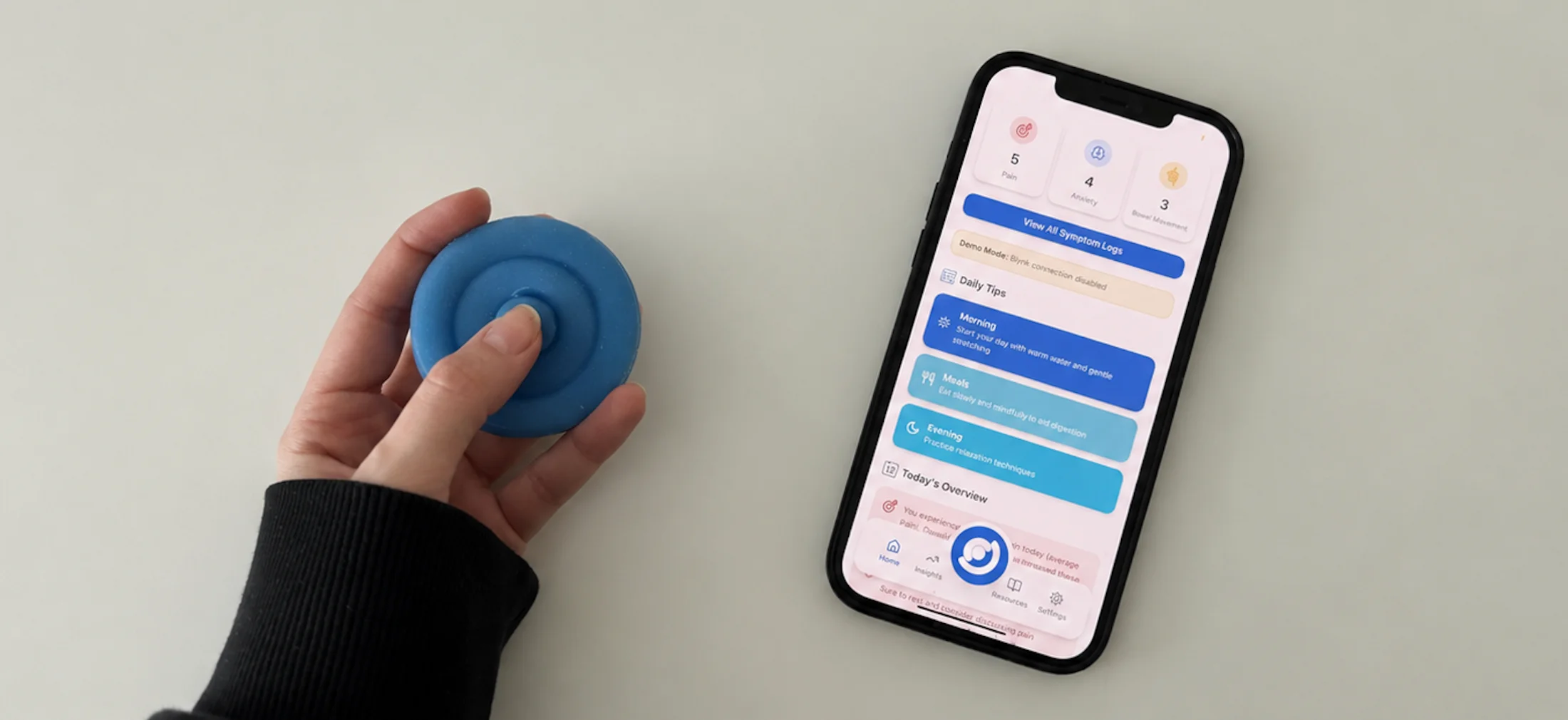
A hand pressing the blue Onaka device beside a phone showing the onaka companion app dashboard with symptom counts and daily tips
§ 01 Problem where it all began

1 in 5 people in the UK have a GI condition. The tools meant to help make things worse.

Existing apps demand frequent logging and create hyper-awareness that worsens anxiety. The gut–brain axis means stress and GI symptoms feed each other, so a tool that adds cognitive load actively harms the people it's meant to help.

"Existing solutions need too much effort, they cause more stress than relief."
— Patient interview · 2024
1/5
UK people with chronic GI conditions
10–20%
of UK population has IBS
3 apps
tested by 5 users over 5 days, all overwhelming
100%
wanted something faster and less effortful
§ 02 Research

Talking to doctors and patients before touching a sketch.

A · Clinicians

Gastroenterologist interviews

Two sessions, project start and mid-development. Key finding: patients can't accurately describe symptoms to doctors without a tracking tool.

B · Patients

Journey mapping

Guided conversations and a day-mapping exercise. Identified the anxiety–symptom cycle and the emotional cost of existing tools.

C · Competitors

App case study

5 users, 5 days. Participants used three leading GI apps and kept diaries. All created hyper-awareness and data overwhelm rather than genuine understanding.

"People need a fast, low-stress way to capture lived experience, and return only the most helpful insights."
— Design insight · synthesised from research
Key insights Anxiety worsens GI symptoms, and vice versa Patients can't recall symptoms without logging Data overload causes hyper-awareness Existing apps feel like another chore Should feel like a companion, not a medical tool
§ 03 How it works one loop, two media

One daily loop, across the pocket and the screen.

Four moments. Two on the device, two in the app. The hand-off between them is the design.
Device
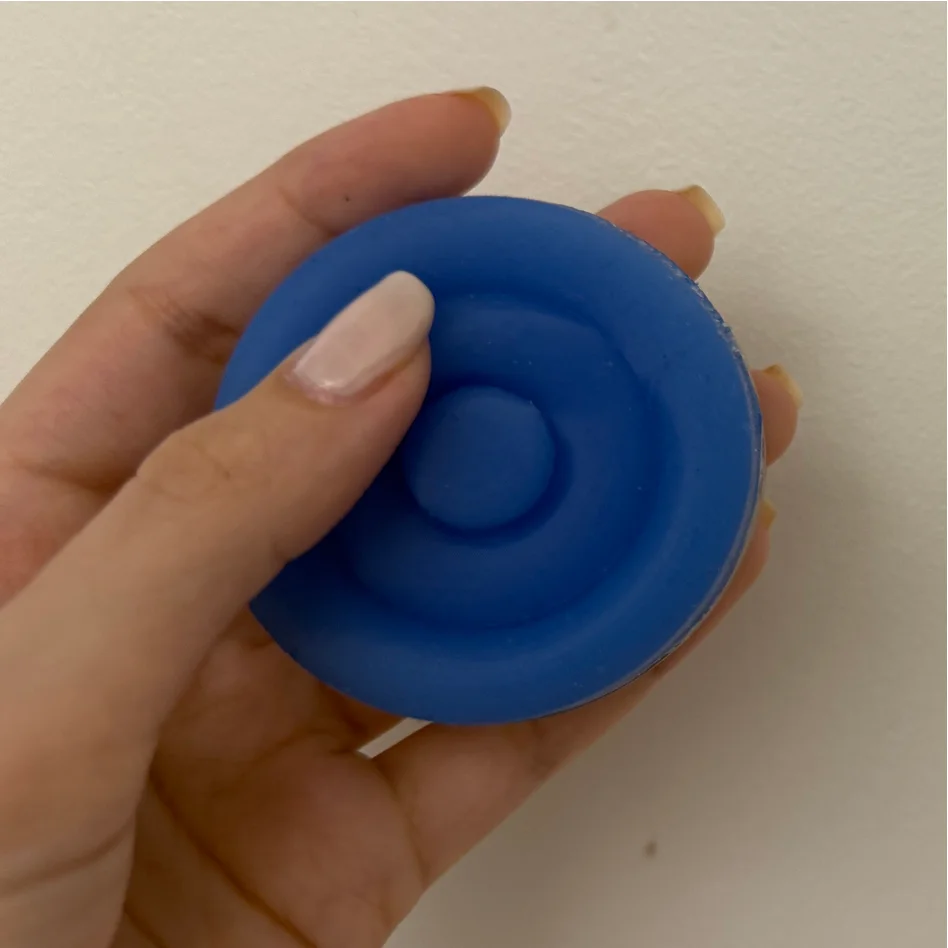
Press to log
Hand pressing the blue Onaka device

Pain, anxiety, or bowel movements in seconds, without opening anything.

Device
Breathe, then carry on
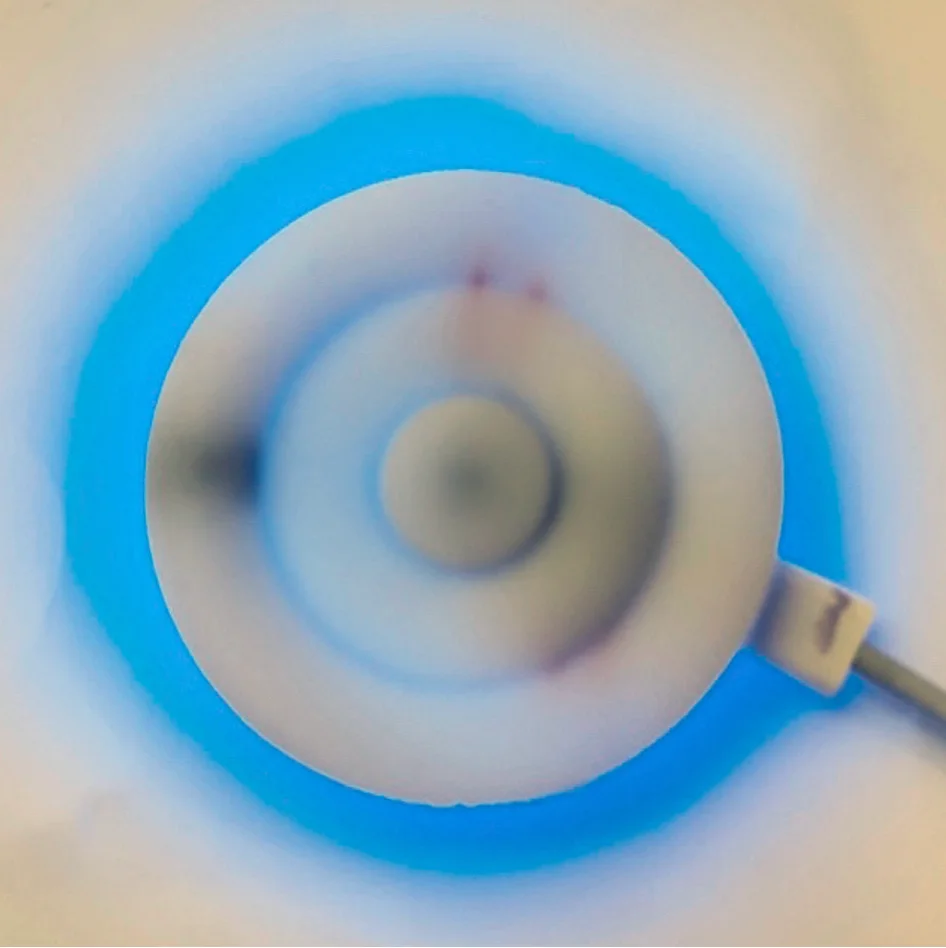
Onaka device emitting a blue NeoPixel breathing pulse

Press anxiety and the device responds, a 5s inhale / 5s exhale pulse, before logging.

App
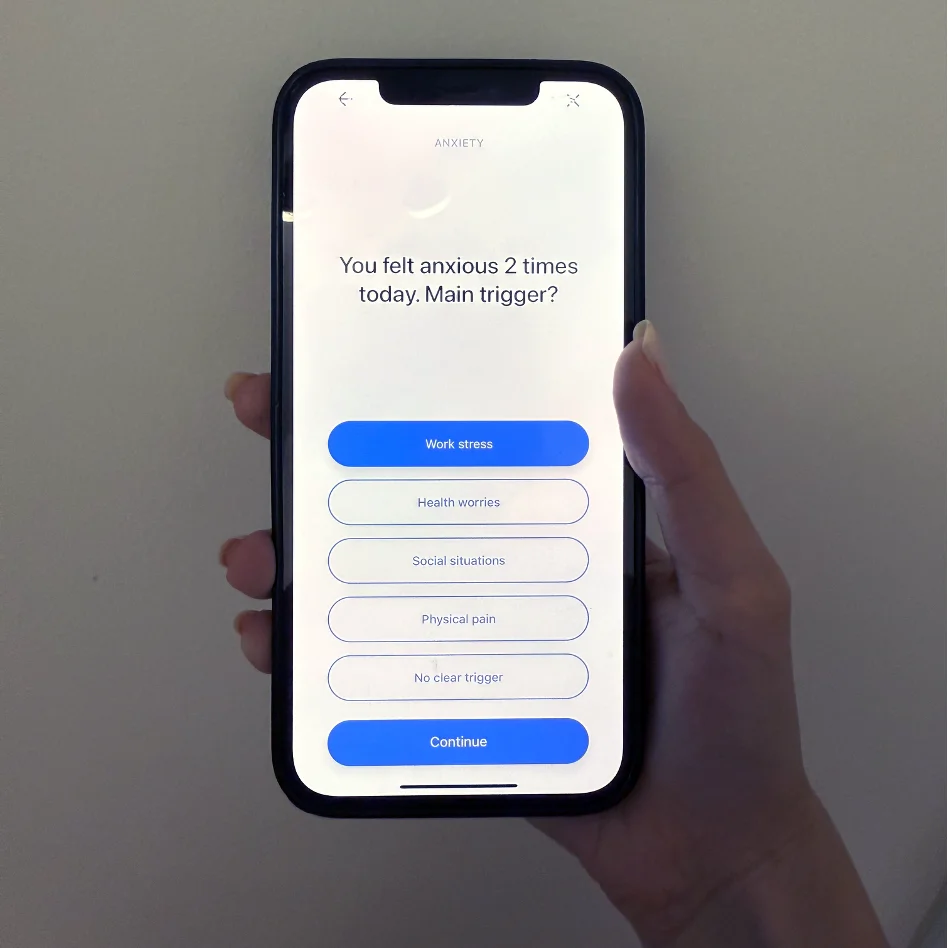
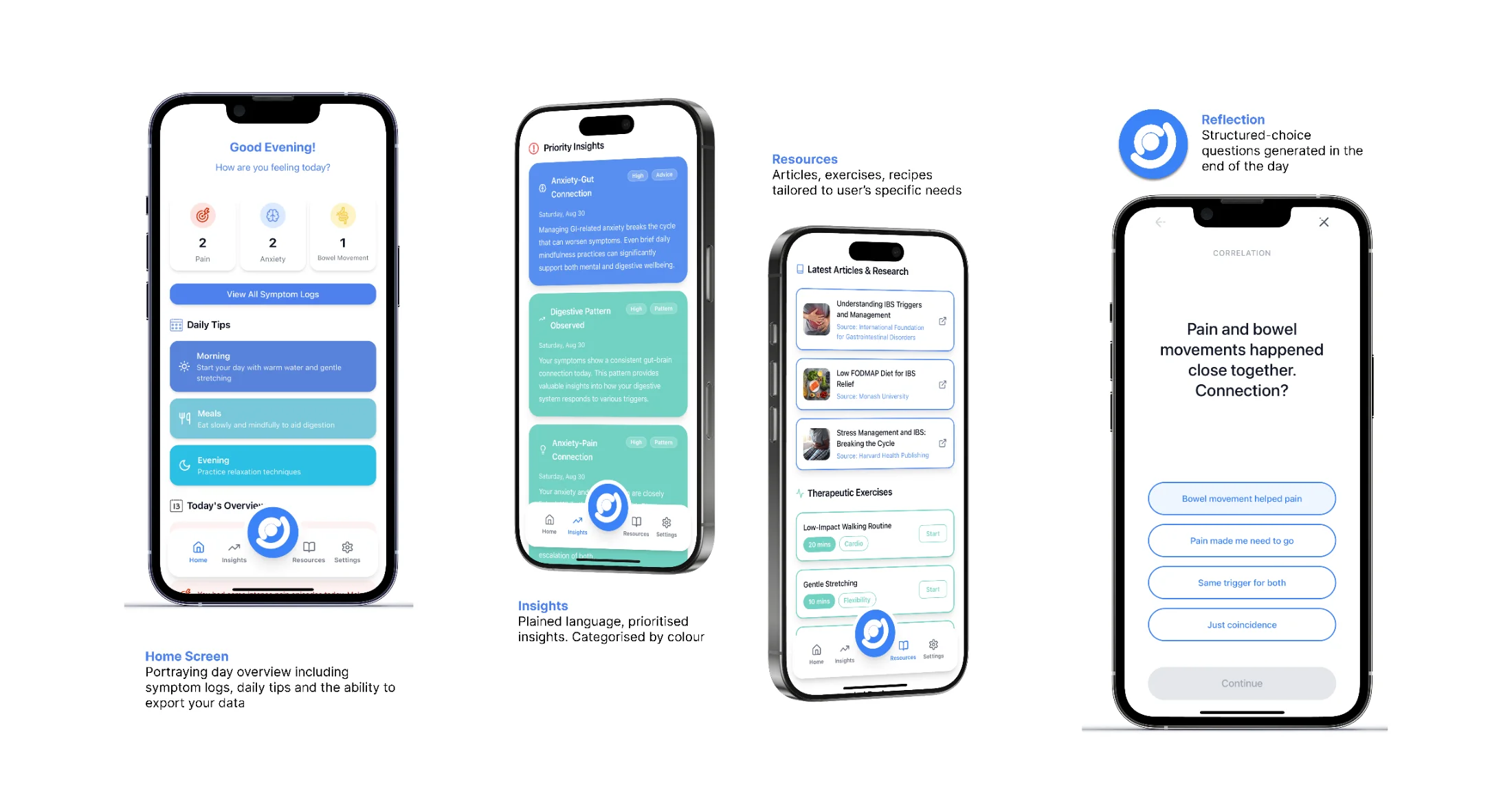
Reflect, once a day
Companion app asking 'You felt anxious 2 times today. Main trigger?'

A single end-of-day question, generated from what was logged. No daily input required.
App
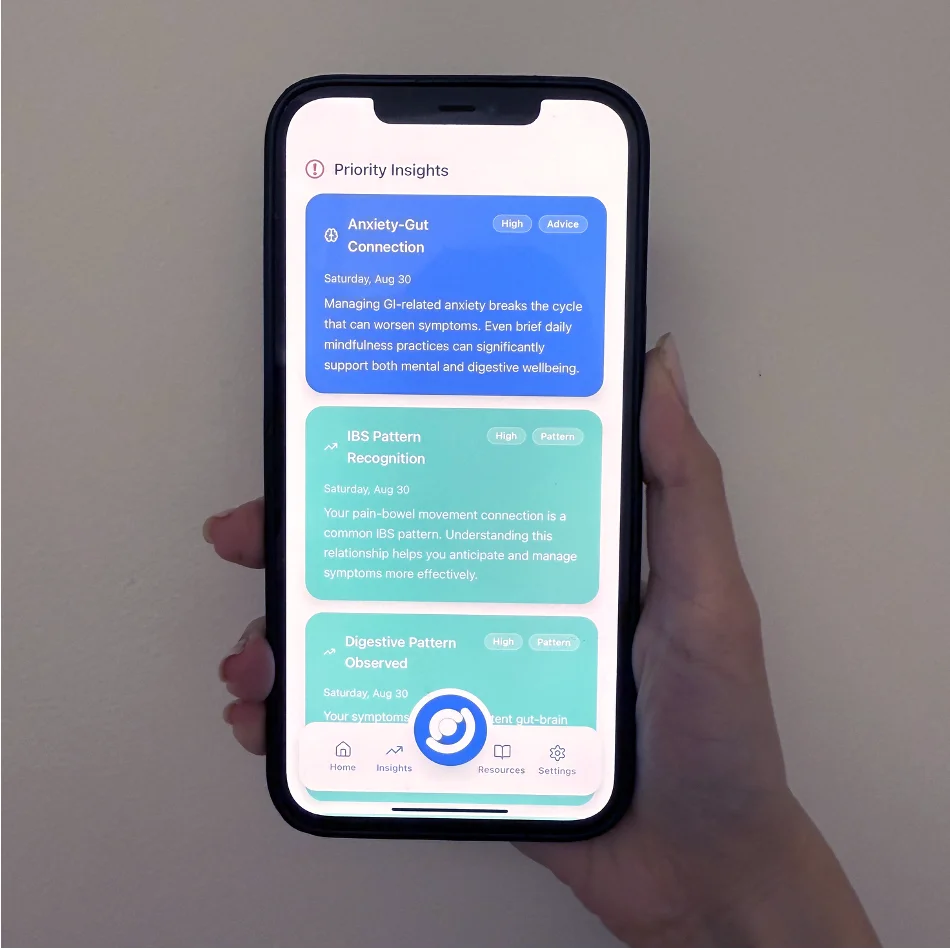
Read, don't decode
Priority Insights screen showing Anxiety-Gut Connection card

Patterns surfaced as plain-English insights, prioritised. No charts, no jargon.

§ 04 The threading where device + app meet

Four places the device and the app are co-designed.

Not two parallel deliverables. The hand-offs are the design.

01
Device → App

Press anxiety, breathe, then reflect.

Tap to see how ↻

The anxiety button triggers a calming pulse on the device, then surfaces as a reflection prompt in the app at end of day.

02
Device → App

Three symptoms, three question banks.

Tap to see how ↻

The device's three buttons aren't arbitrary. Each one defines a bank of reflection questions the app can ask.

03
Shared form

Three rings, one mark.

Tap to see how ↻

The device's concentric rings became the logo. The logo's o became the brand name, onaka, "tummy" in Japanese.

04
Device + App → Doctor

Lived data, compiled.

Tap to see how ↻

The device captures symptoms a patient can't recall in clinic. The app compiles them into a shareable medical report.

Chapter A · The device

A pocketable, tactile object designed for seconds-long capture, without screens or screens-shaped behaviour.

§ 05 Decision 01 the hardest pivot

Why I abandoned gesture input.

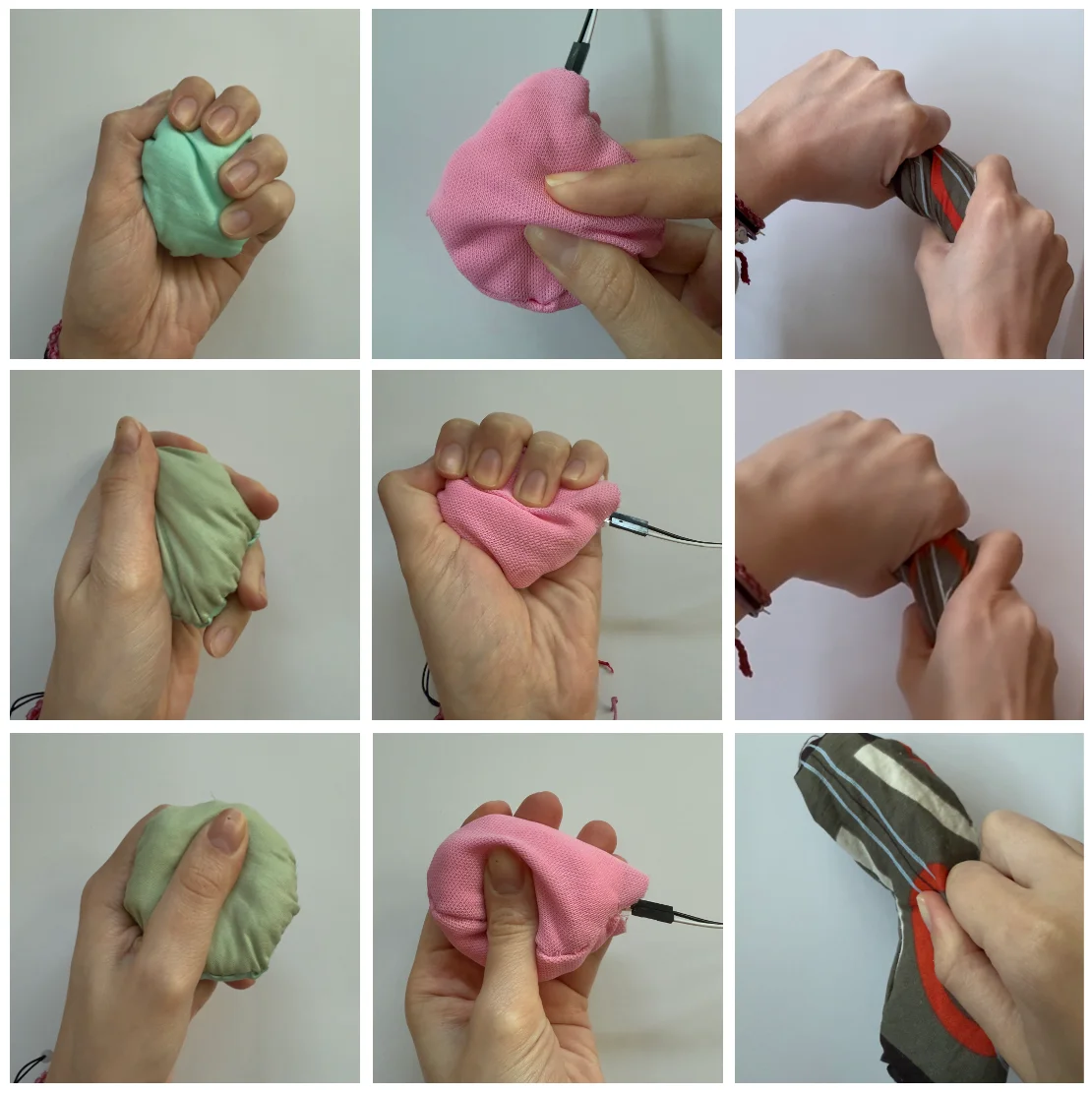
Users loved the tactile quality of squeezing fabric, but they couldn't trust their inputs were registering. The data corrupted itself.

Original concept

Squeeze, twist, pinch.

Three gestures to log three symptoms. Tactile and playful, but unreadable to the device.

  • No confirmation that a gesture had registered
  • Squeezing felt satisfying as a fidget, corrupting data
  • FSR sensor couldn't reliably distinguish patterns
  • Robotics expert confirmed: unreliable in advanced systems
Nine-up grid of fabric squeeze prototypes in green, pink, and striped patterns being held and squeezed this didn't work
Fabric squeeze prototypes, tested for grip and gesture.
Final solution

Three buttons, integrated into the form.

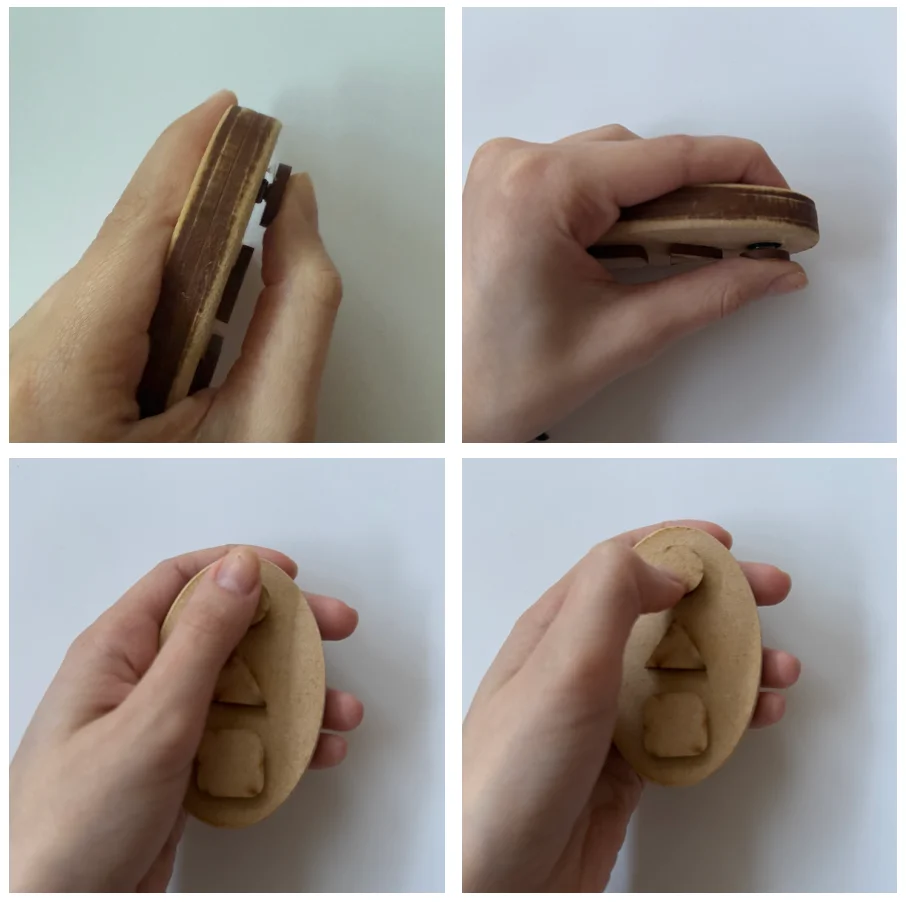
Buttons give immediate, unambiguous confirmation. Concentric ring layout means each is distinguishable by touch, usable from a pocket without looking.

  • Short / long press differentiates severity
  • Raised ring edges guide fingers without looking
  • NeoPixel confirms input, blue breathing pulse for anxiety
  • No accidental logging during ordinary handling
MDF prototypes of the button-based device showing edge profile and raised tactile button shapes
MDF prototypes, testing edge profiles and button shapes.
§ 06 Decision 02

Three symptoms, no more.

A second gastroenterologist interview asked which daily GI factors matter most to capture. Pain, anxiety, and bowel movements were chosen because they are spontaneous, identifiable in the moment, and the visible surface of deeper patterns. This lets the app generate targeted reflective questions rather than asking users to fill in a form.

Design principle

"Capture the minimum data that allows meaningful questions to be asked at end of day."

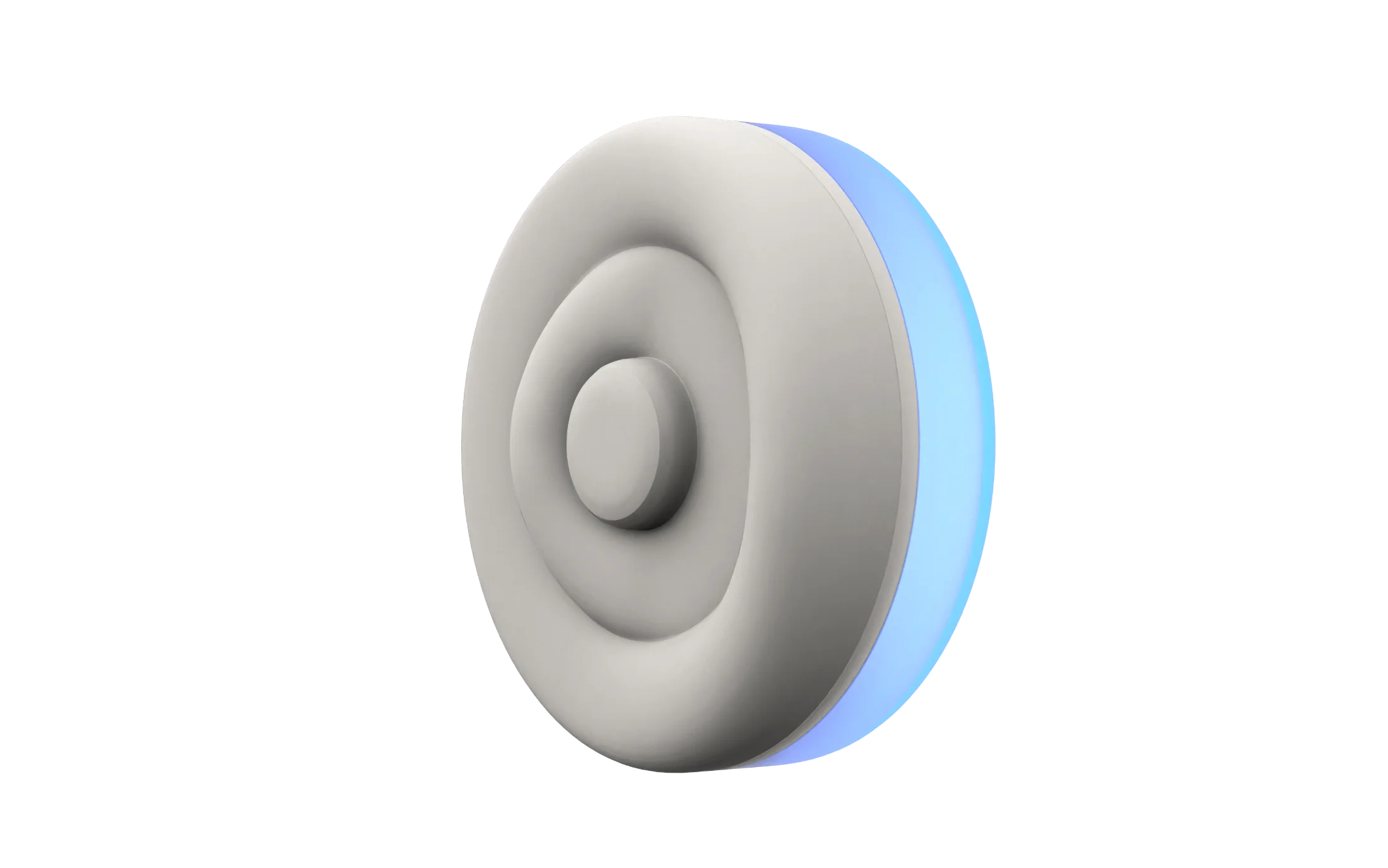
the final shape 3D render of the Onaka device showing three concentric rings — centre button, middle ring, and outer ring with blue NeoPixel glow
01 · Centre button

Pain

The most urgent symptom. Short press = mild, long press = severe.

02 · Middle ring

Anxiety

Triggers a blue NeoPixel breathing pulse, 5s inhale / 5s exhale, as immediate calming feedback.

03 · Outer ring

Bowel movement

Three press durations differentiate between normal, loose, and hard movements.

§ 07 Concept & form how the ring emerged

From many directions to a silicone ring.

The brief was a calm object that lives in a pocket, presses without looking, and feels nothing like a screen. Many directions, many MDF prototypes, then silicone, on the way to the final form.

1 · Ideation

Many directions, all tactile.

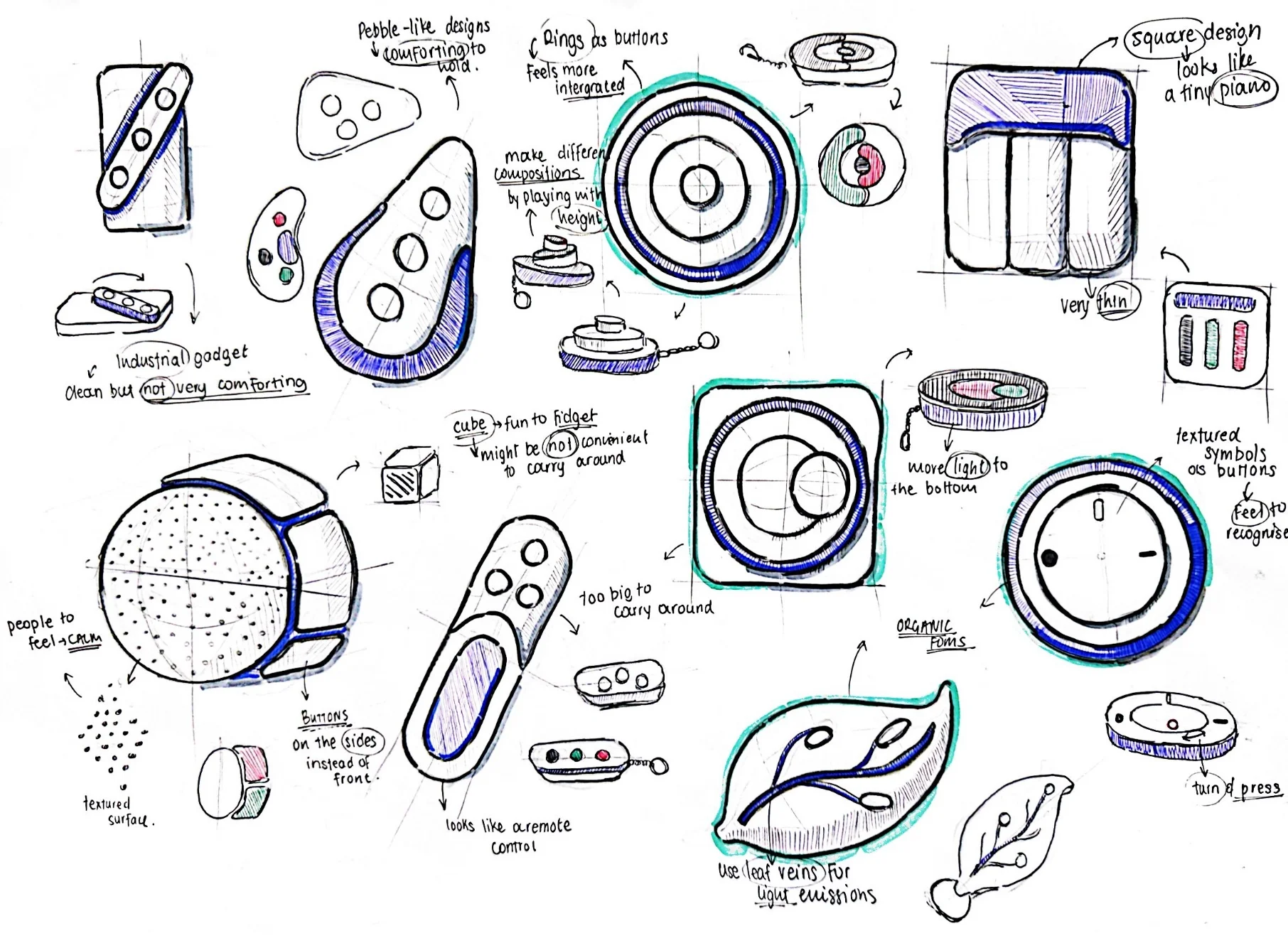
Initial concepts ranged from a ripple disc, a soft cube with corners-as-buttons, a pebble, to a leaf pod. Every direction was anchored to one constraint: it had to be operable by touch alone, in a pocket, without a screen.

Sketch grid of early concept directions, including ripple disc, soft cube, pebble, and leaf pod
Concept directions, touch-only.
2 · MDF prototypes

Many forms, in the hand.

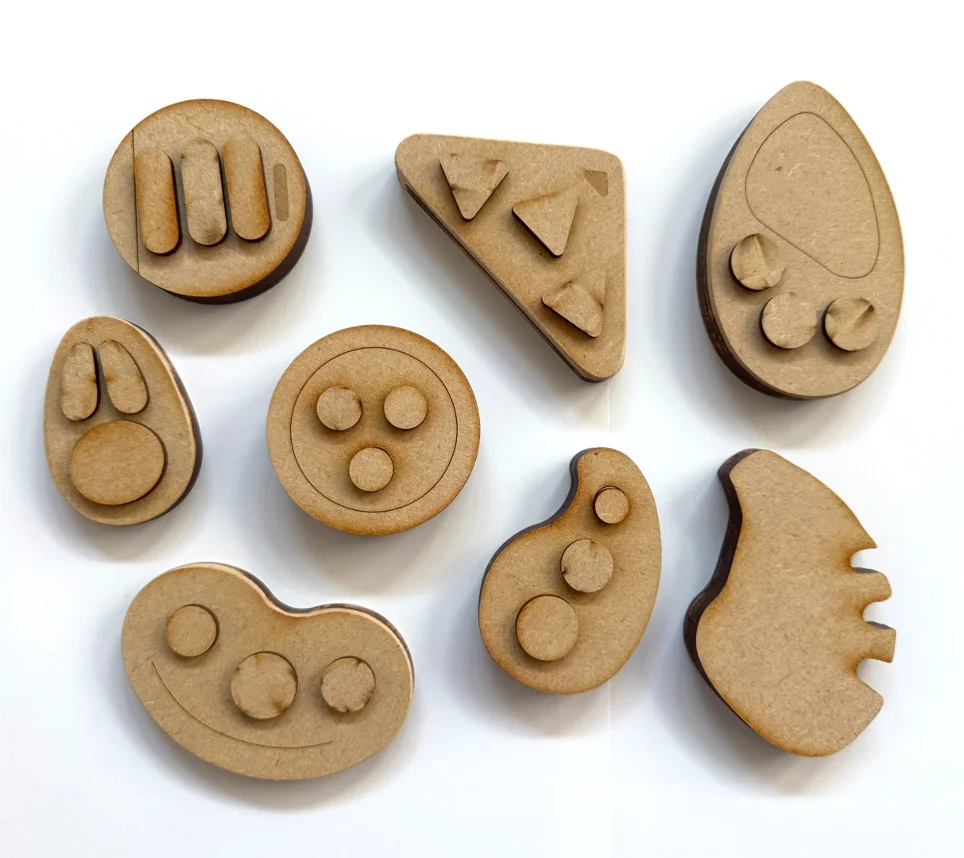
Laser-cut MDF and acrylic let me test grip, button placement, and accidental-press resistance on each direction. Buttons and lights were wired into each prototype so users could feel the actual interaction, not just the silhouette.

MDF prototypes laid out, each a different form being held and pressed
MDF prototypes, button-wired for testing.
3 · The ring, in silicone

Three concentric rings, cast in silicone.

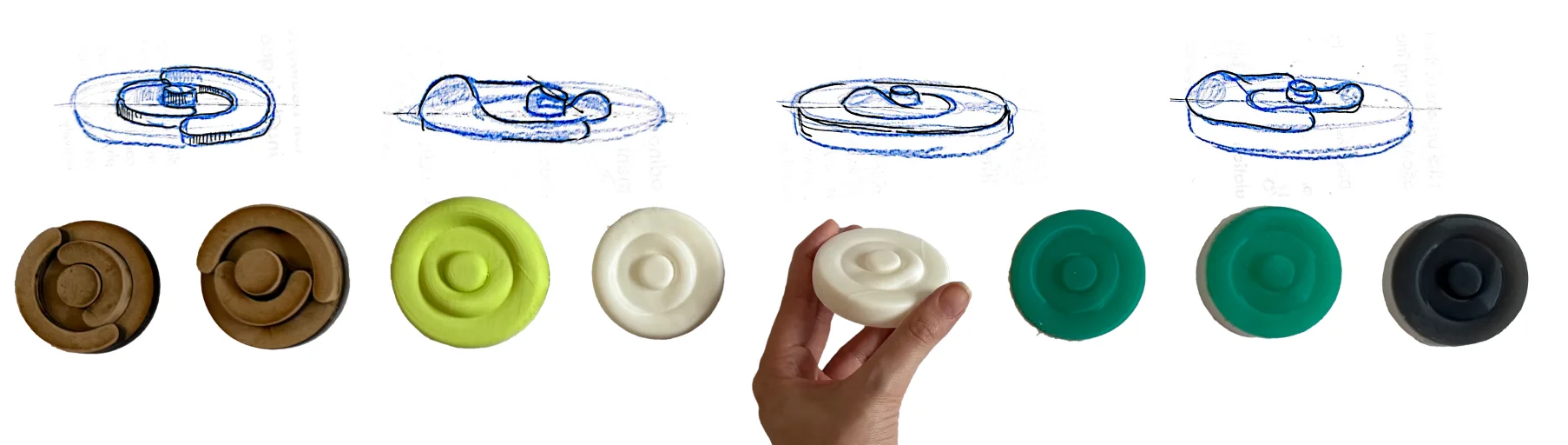
The disc-with-rings won across every test: locatable by touch, no accidental presses, and a layout that maps to symptom hierarchy — centre for pain, middle for anxiety, outer for bowel. Cast from two-part silicone in matte tones that read as object, not gadget, with a NeoPixel ring underneath for the breathing pulse.

Iteration sequence from MDF and wood prototypes to 3D-printed and cast silicone discs in green, white, and black, with side-view sketches above each
MDF, then 3D print, then cast silicone.
§ 08 Building it for real electronics & path to production

A working device, pocket-sized.

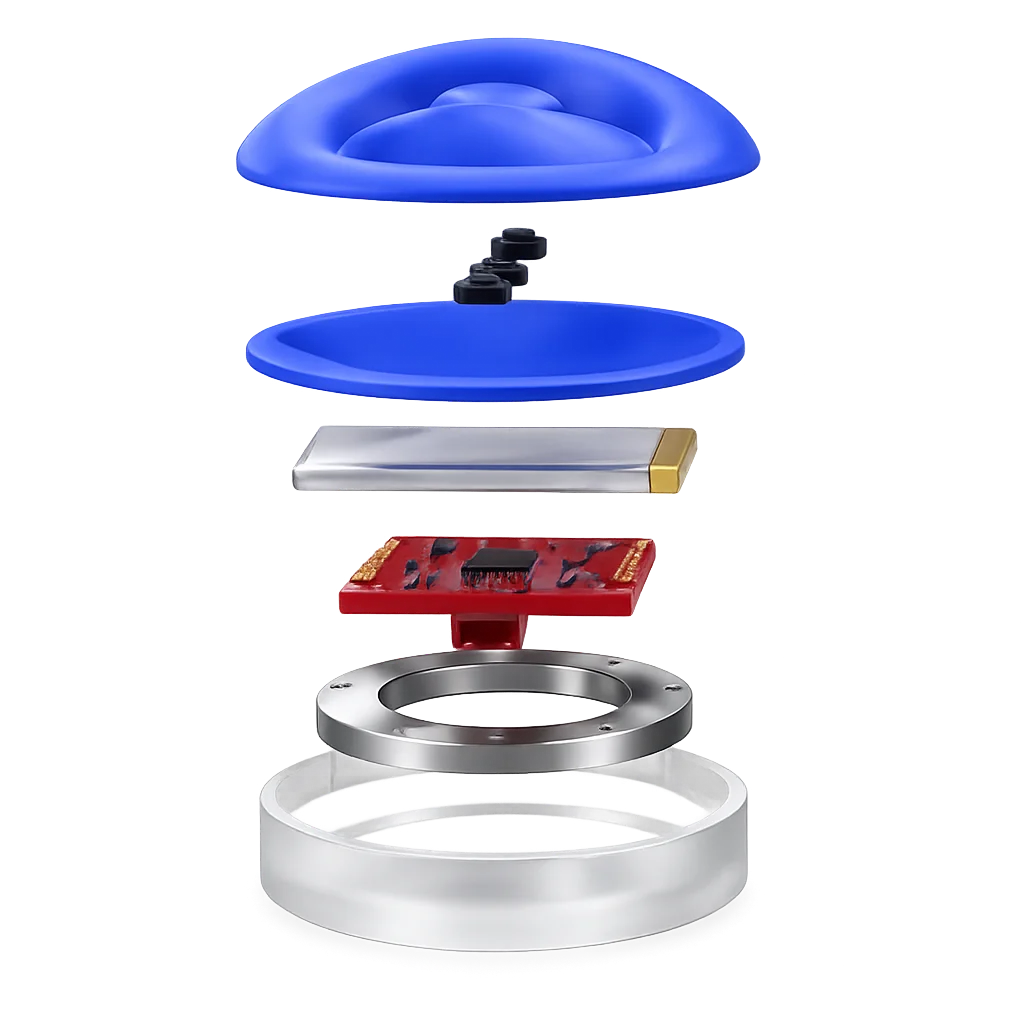
The internals went through three microcontrollers before settling on the SparkFun Qwiic Pocket, the only board small enough to fit the final 60 mm form factor while still carrying Wi-Fi. The full electronics stack runs on a 1200 mAh LiPo, charges over USB-C, and pushes button events to the app over Blynk IoT.

Exploded render of the Onaka device showing the silicone button interface, PLA stiffener, NeoPixel ring, SparkFun Qwiic Pocket microcontroller, and 1200mAh LiPo battery in the SLA resin base
Exploded view, every part from silicone shell to SLA base.
01

Silicone shell + buttons

Two-part cast silicone with three integrated buttons. Skin-safe, water and UV resistant, dyed in matte finishes. Sits over a 2 mm PLA stiffener so presses register without flex.

02

1200 mAh LiPo + USB-C

Connected via 2-pin JST. Charges through a USB-C port machined into the SLA base. Sized for several days of typical use between charges.

03

SparkFun Qwiic Pocket

Wi-Fi-capable microcontroller chosen for its compact footprint, the third board after testing M5StickC Plus and Arduino Nano 33 IoT. Pushes events to Blynk over Wi-Fi.

04

NeoPixel ring, 12 LEDs

Mounted under the rear face. Pulses blue at 5 s inhale / 5 s exhale for anxiety, confirms button input, and shows connection and battery state.

05

Blynk IoT cloud

Each button press is sent as an event to the Blynk cloud, which the app retrieves via auth token. A demo mode bypasses the cloud for offline review.

Path to production

The prototype uses PLA for the stiffener and SLA resin for the translucent base. Both are slated for swap to injection-moulded polypropylene in production for durability and cost. The current SparkFun board is a development part, the production direction is a custom PCB sized to the same 60 mm footprint.

Chapter B · The app

What a pocket object can't carry: reflection, history, and a trail for the doctor.

§ 09 Decision 03

Testing the interaction model before designing the UI.

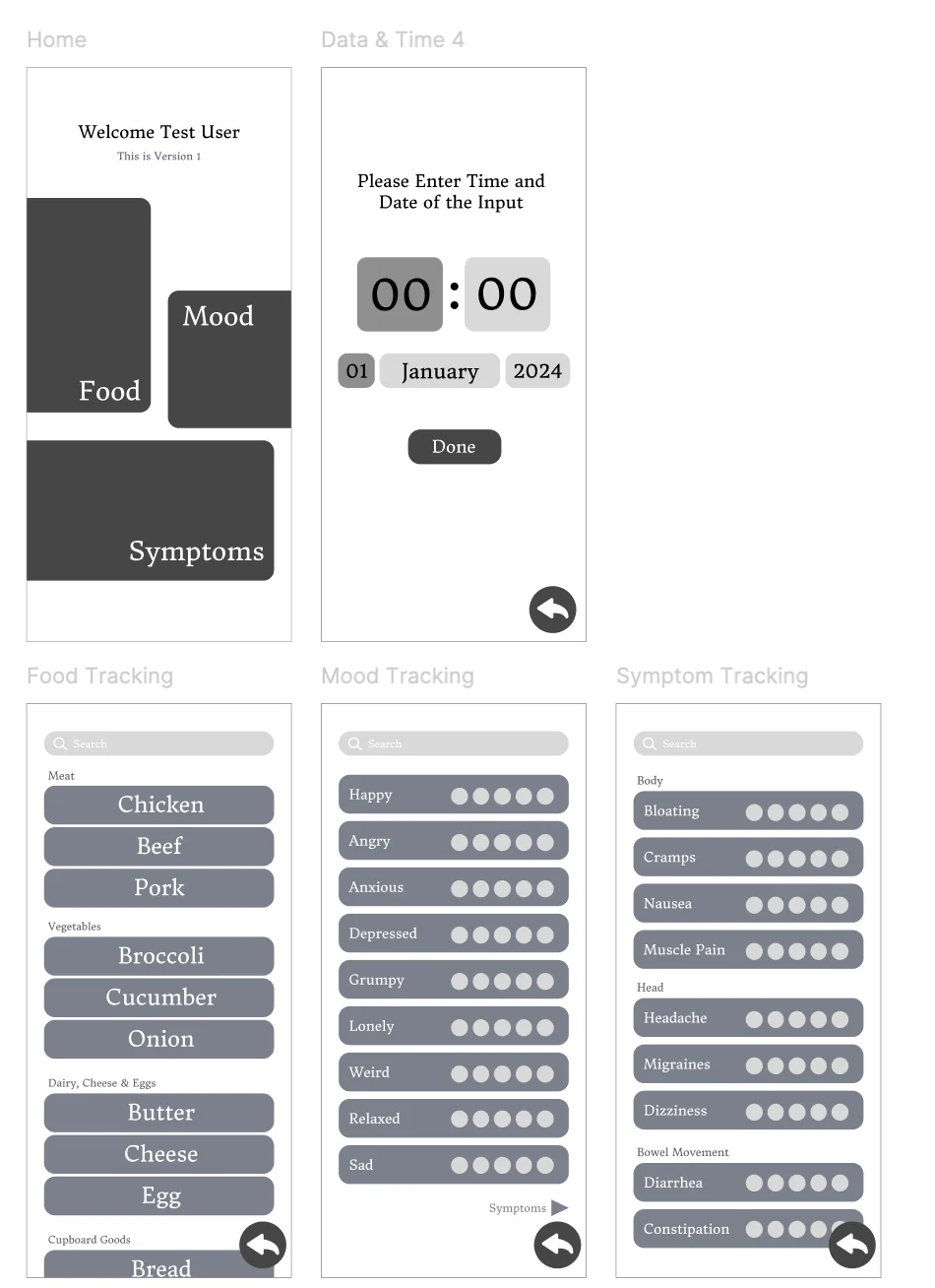
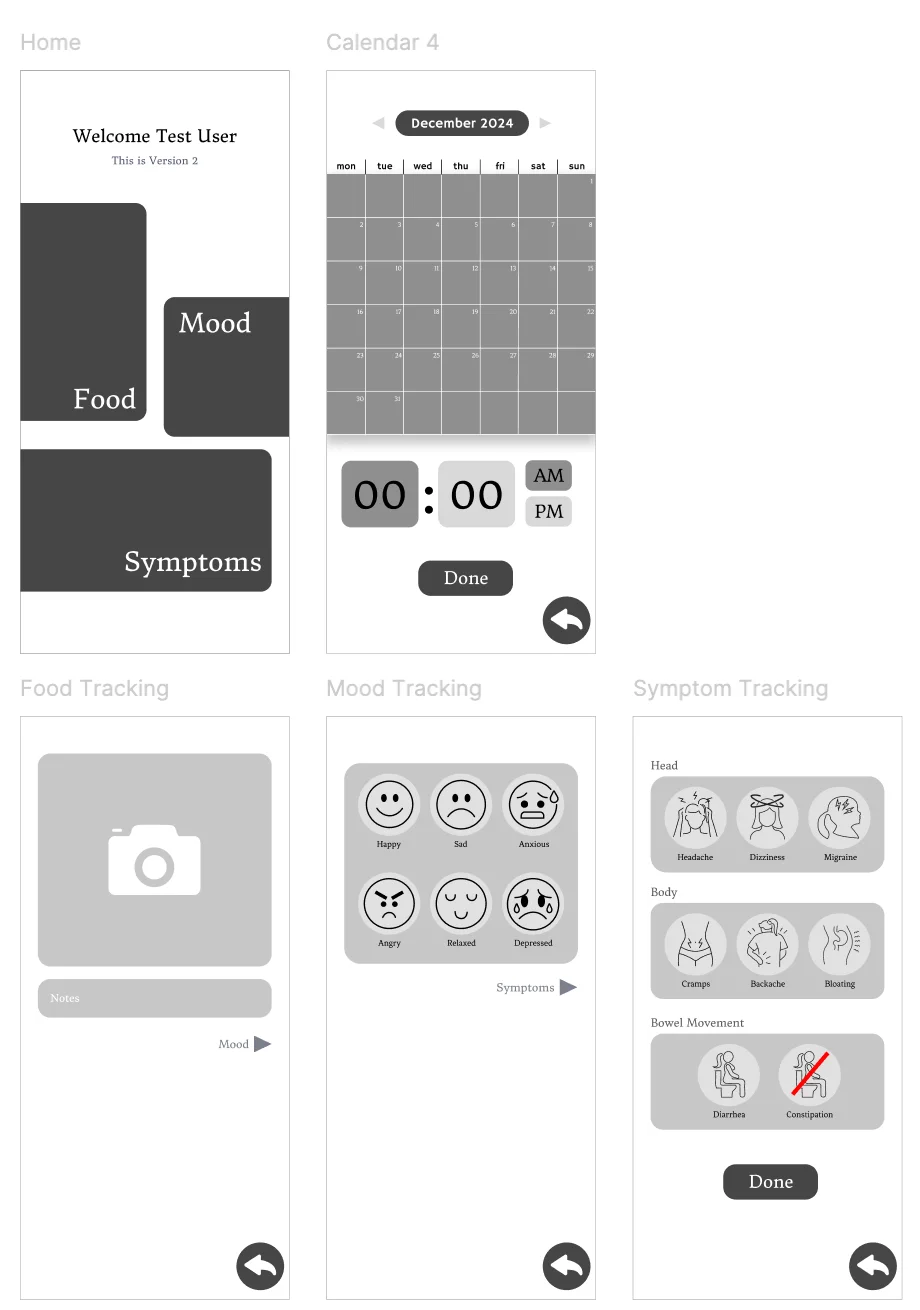
Four parallel low-fidelity prototypes were built in Figma, each testing a different input philosophy, and put in front of 5 participants over several days. The winning method defined the entire app's interaction model.

Method 01 · Winner Lists method prototypes — categorised picker lists for food, mood and symptom tracking

Categorised lists

Preferred, 3 / 5 participants
Why it won
Fastest to complete. No typing. Familiar mental model. Worked when participants were tired or in a hurry.
Method 02 Icons method prototypes — emoji-based mood faces and body-part illustrations

Icons & illustrations

Backup, 2 / 5 participants
Why it lost
Ambiguous icons forced re-reading. Several participants found the visual language too playful for a tool meant to support a chronic medical condition.
Method 03 · 04 Free text and voice input prototypes — open type fields and voice modal

Free text & voice

Rejected, 0 / 5 preferred
Why it lost
Free typing felt like another effortful task at the end of an already tiring day. Voice input was rejected for use in shared or public settings. Both methods raised cognitive load instead of reducing it.
What it changed

From "open input" to structured choice.

Every input the app would ever ask for got rebuilt as a multiple-choice prompt. No blank fields, no "type your answer here", no voice capture. Voice survived in one place only, as the AI's voice when reading the daily reflection question aloud, never as the user's.

App principle

"The device handles all logging. The app exists for reflection, and reflection happens at the user's most tired moment of the day."

§ 10 The reflection system questions in, insights out

Eight to twelve questions, generated from what was logged.

Three banks behind the scenes, one for bowel, one for pain, one for anxiety, plus an end-of-day wrap-up. When two symptoms occur close together, the app pairs them and asks a conditional question that links the two.

Conditional questions
Pain + Bowel Tap for the question ↻

"Did the pain lessen after going to the toilet?"

Anxiety + Pain Tap for the question ↻

"Did the anxiety arrive before the pain, or after?"

Anxiety + Bowel Tap for the question ↻

"Did stress feel like it changed what happened in the gut?"

What the answers become

Plain, actionable sentences. No graphs.

Answers are written back as short, plain-English insights, prioritised by urgency.

Priority

Pain has eased after bowel movements three times this fortnight.

Pattern

Anxiety tends to precede pain by 30 to 60 minutes on weekdays.

Food

Bowel discomfort followed dairy four times this month.

Advice

Try the device's breathing pulse next time anxiety arrives.
§ 11 IA + visual system the logo, at the centre

Four tabs, with a central button for the only screen that asks.

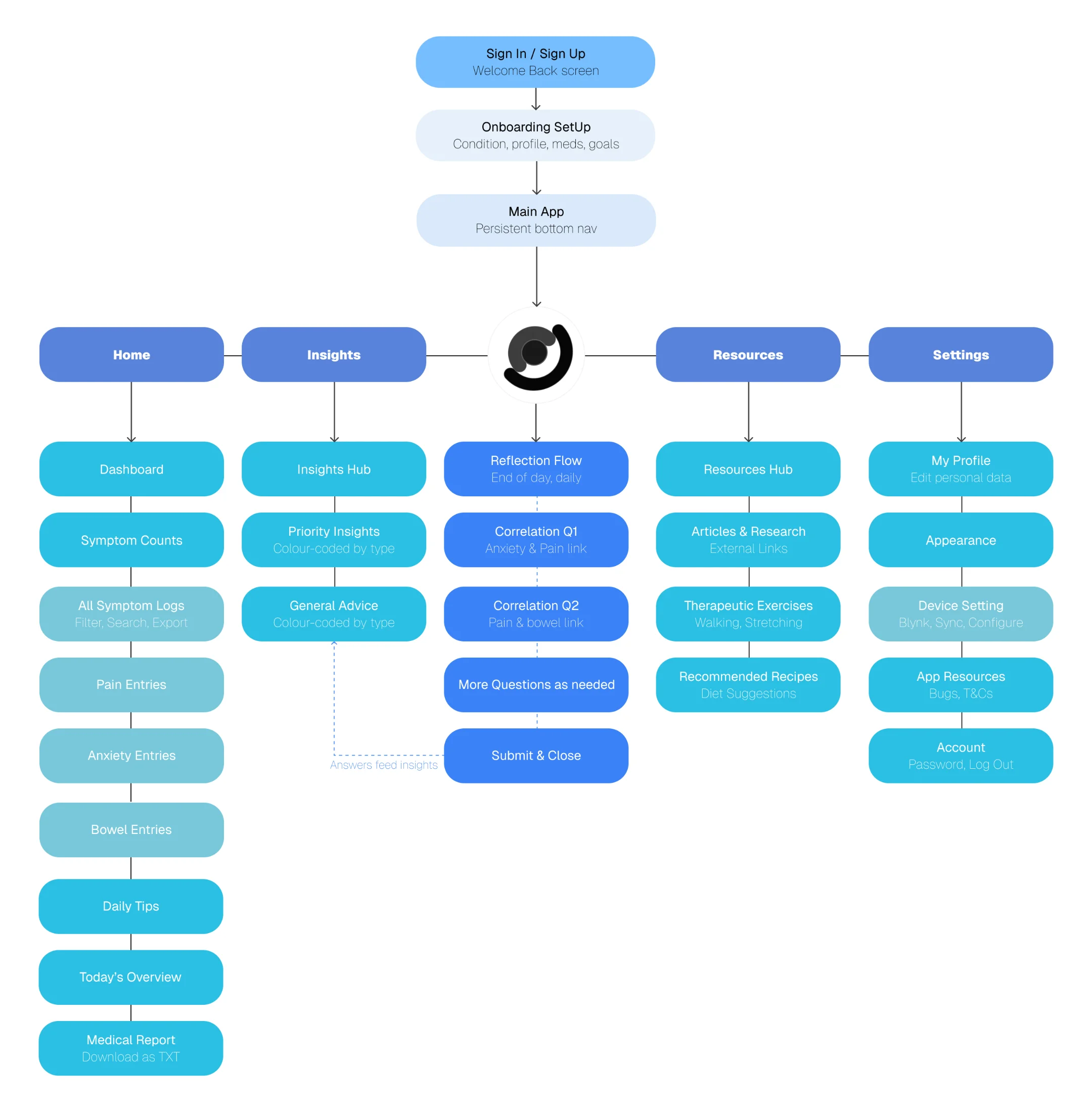
Four bottom-nav tabs cover everything passive, Home, Insights, Resources, Settings. The reflection flow sits on a fifth, central button, raised above the bar, marked with the logo. It's the only place the user is asked to think, and it lives where the app's geometry naturally points.

Sitemap of the Onaka app showing Sign-in/Sign-up leading to Onboarding Setup, then Main App with five children: Home, Insights, the central Reflection Flow, Resources and Settings. Each child branches into its sub-screens, with a dashed line showing reflection answers feeding back into Insights.
Site map: a five-tab main app, with reflection at the centre.

Soft blues for calm, three accents for the symptoms.

The base palette is shades of blue, chosen against the clinical grey of existing GI apps and the pink of period-tracker conventions. Symptoms keep three warm accents so they read at a glance in logs and insights.

Base
Blue · deep
Blue· bright
Blue · green
Blue · cream
Symptoms
Pain · red
Anxiety · blue
Bowel · yellow
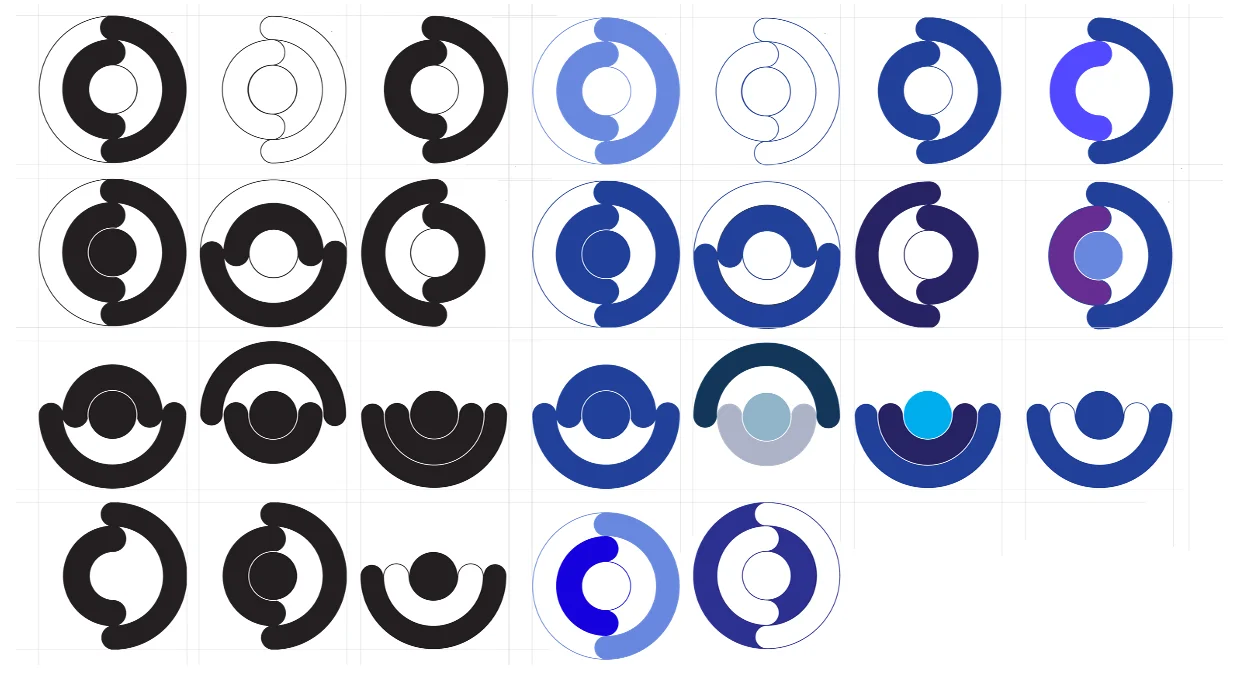
Logo iteration sheet — rows of concentric ring marks exploring positive and negative space, then in blue colour studies
Three concentric rings became the o-letter, then the name.

The logo named the product.

The mark started as the device's three concentric rings, simplified into a circular form that doubled as the letter o. The product needed a name with an o in it that the logo could replace. Onaka, Japanese for "tummy," fit the meaning of the product and the shape of the mark in a single word.

§ 12 Final screens the app, in motion

Built in Lovable. Connected via Blynk.

A walking prototype, end to end, hardware to insights. Below, the app demo running on the device, then the six screens that anchor the day-to-day experience.

App walkthrough.
01 · Home
Home screen showing today's symptom counts, daily tips, and a button to compile data for a doctor
Today's counts and tips.
02 · Symptom logs
Symptom log view showing pain, anxiety, and bowel entries with timestamp and severity
Entries with time and severity.
03 · Reflection
Reflection screen, full-screen, no menu visible, showing a question with multiple-choice answers
Full-screen, structured-choice questions.
04 · Insights
Insights screen showing plain-language insights organised into priority, patterns, food, and advice
Plain-language sentences, prioritised.
05 · Resources
Resources screen with articles, exercises, and recipes filtered by the user's GI condition
Articles, exercises, recipes by condition.
06 · Doctor report
Compiled doctor report screen showing symptom history and reflection summary ready to share
Downloadable medical report.
§ 13 Final product all together now

Onaka, a system designed around calm.

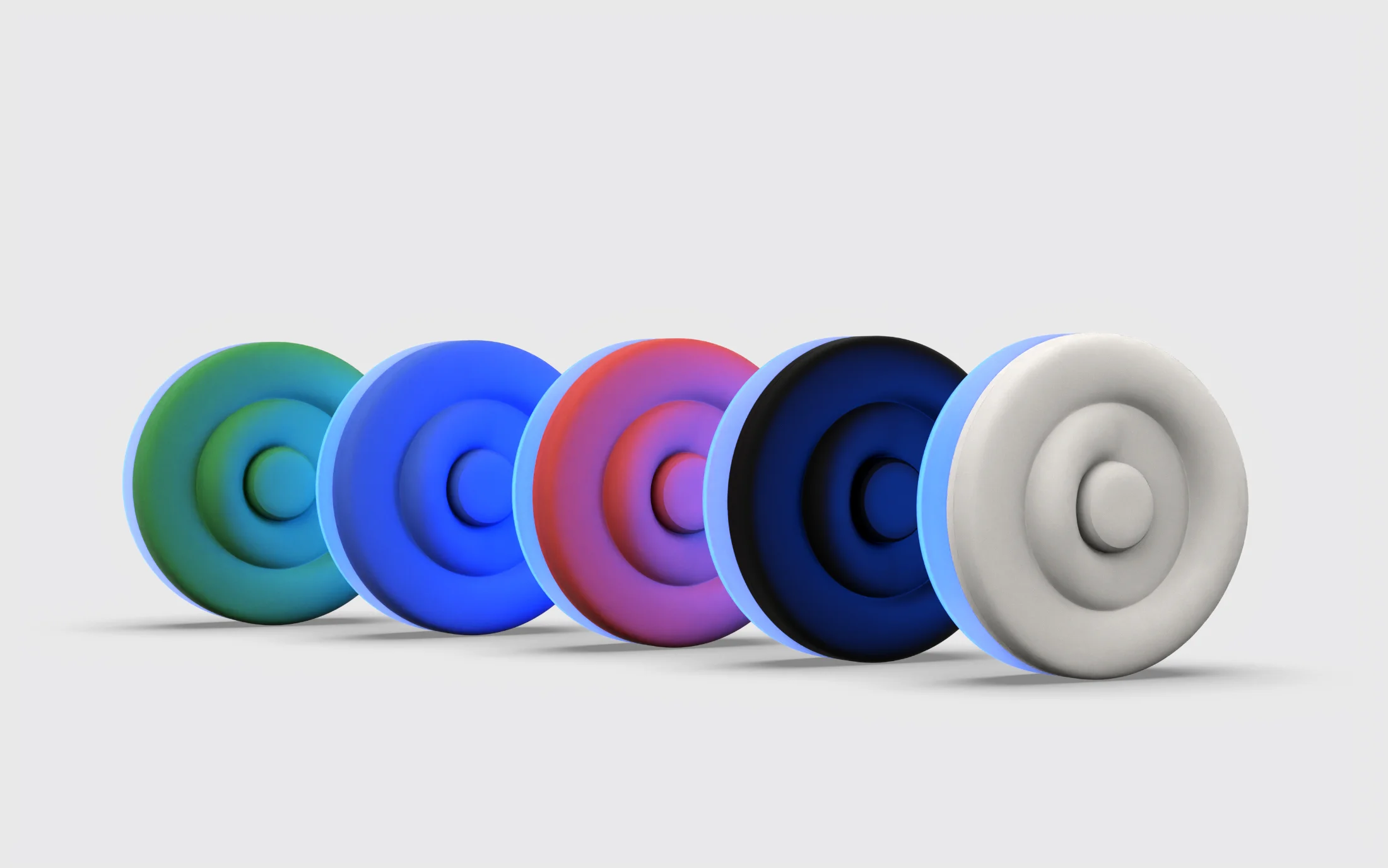
proudest of this The five colour variants of the Onaka device lined up, green to white, each with a blue glow
Five colourways, each with the signature blue base glow.
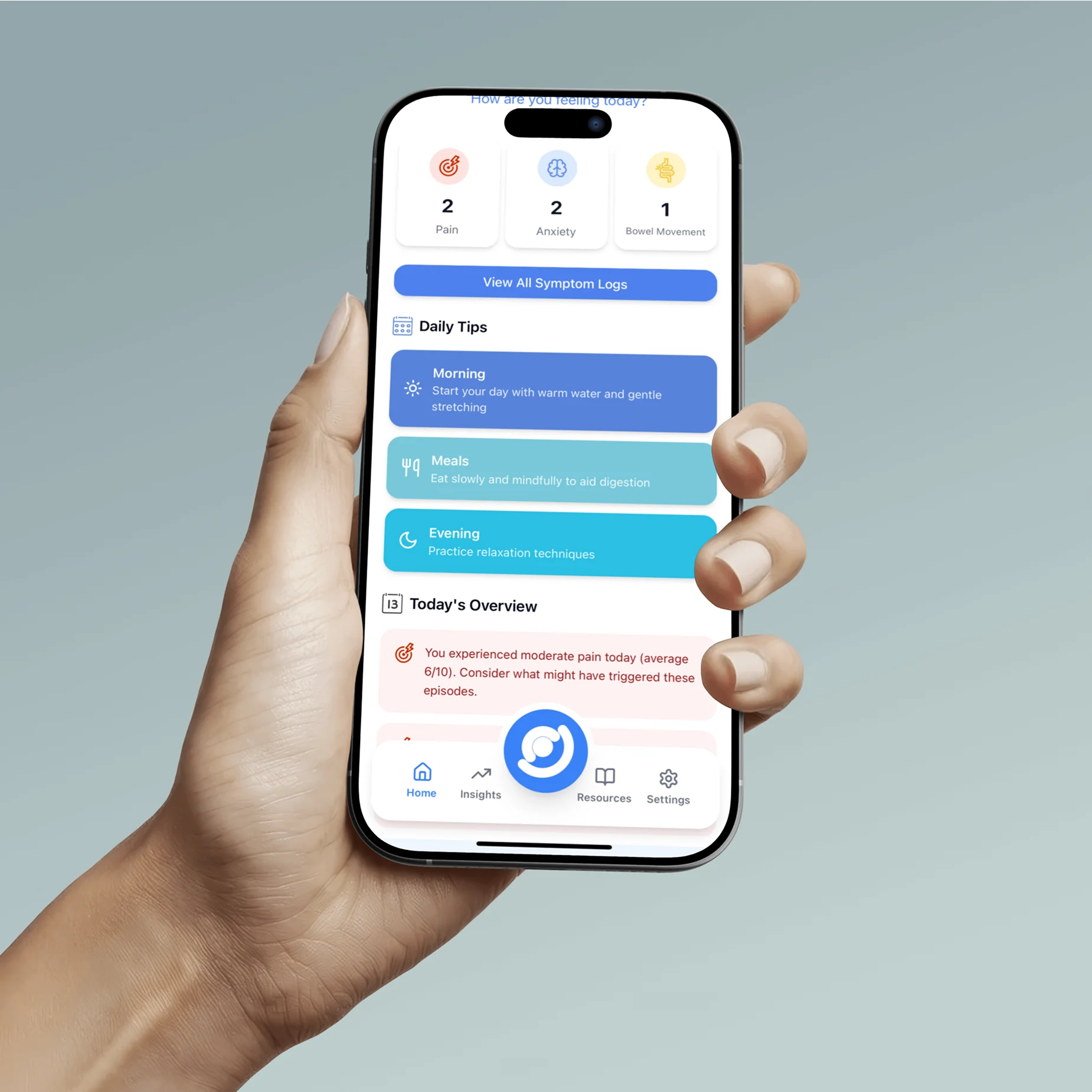
The Onaka companion app held in a hand, showing the home dashboard: today's symptom counts, daily tips and today's overview
Home dashboard — daily tips and today's overview.
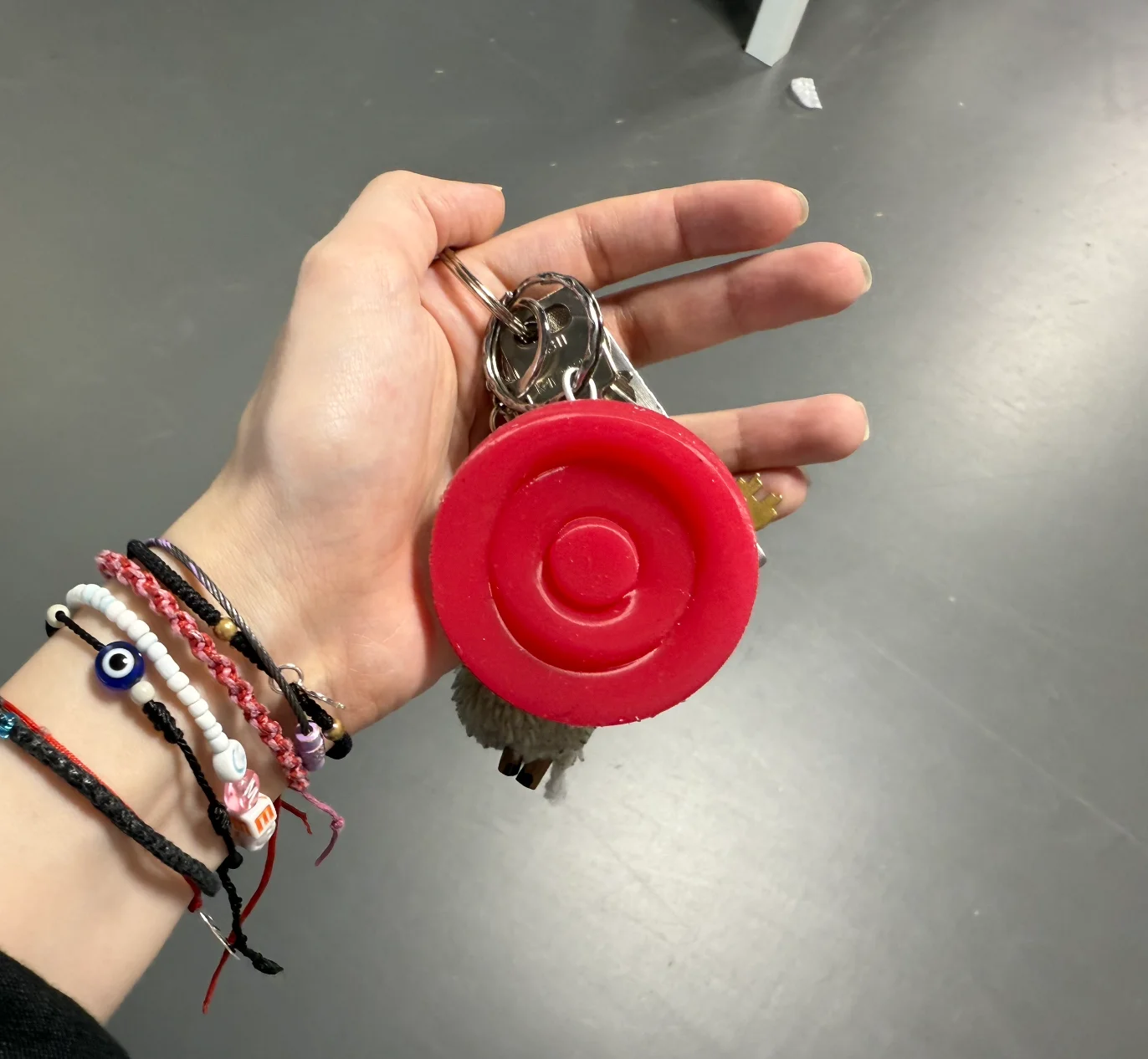
The red Onaka device on a keychain, held in a hand
Pocketable, on a keychain for everyday carry.
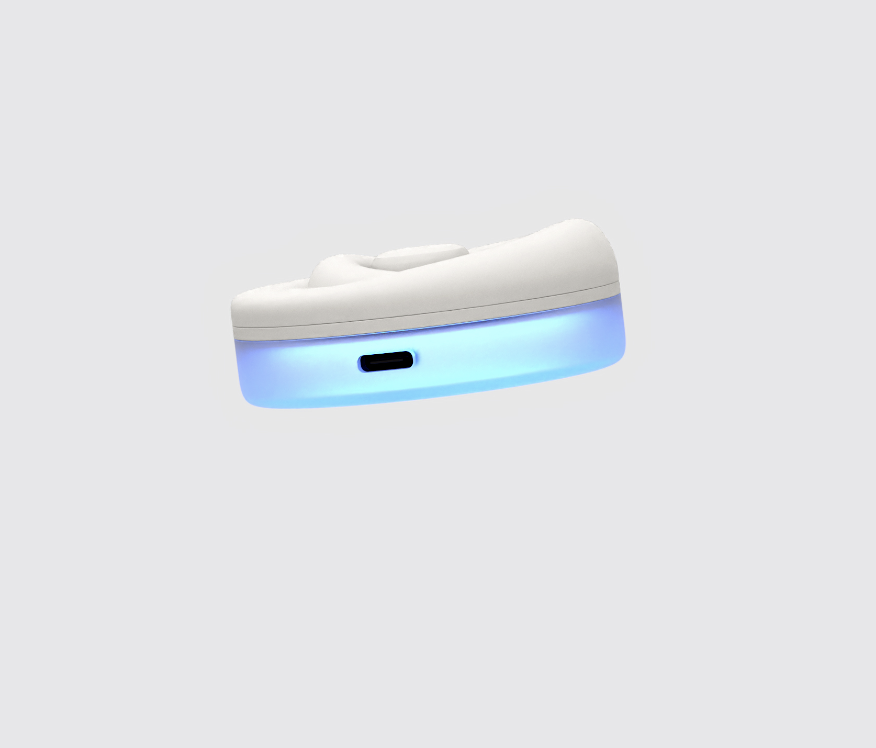
Side view of the white device showing the USB-C charging port and blue base glow
USB-C charging in the glowing silicone base.
Demonstration video: the device and companion app in use.